

Platform & AI
Oncology Workflow Software
Oncology work queues with clear owners: authorizations, pre-mix checks, financial counseling, charge review and denials, each routed to the right desk.
Oncology Workflow Software routes each task in a medical oncology practice to the person who owns it: authorization requests, pre-mix checks on costly drugs, financial counseling referrals, charge reviews and denials. Each queue shows the deadline and the next step, and work that stalls is raised to a lead before it costs the practice.



 6,500+ specialty providers
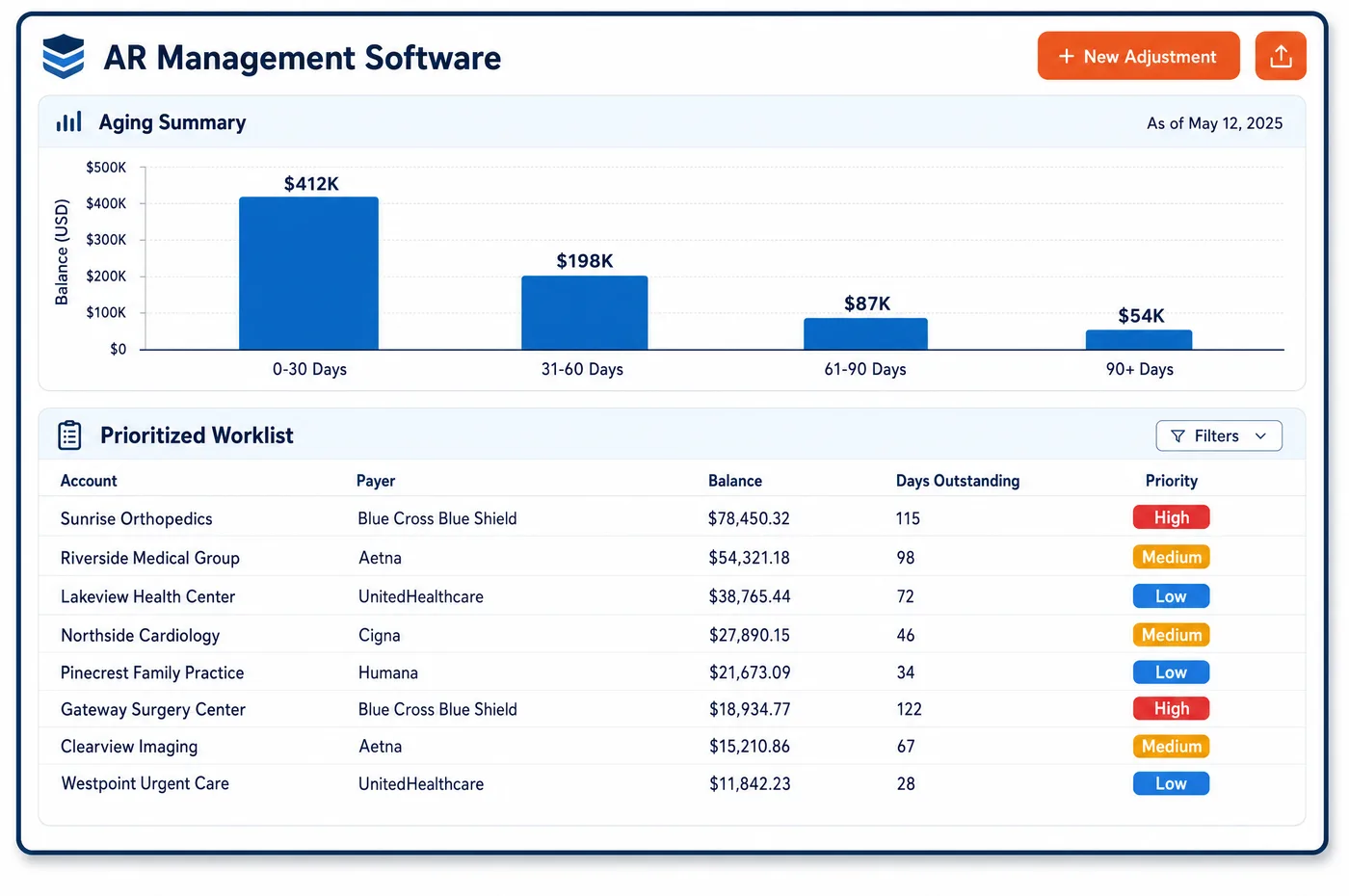
Workflow in a Oncology Practice
Medical oncology work passes through many hands. A new regimen moves from the oncologist's order to the authorization team, then to the financial counselor, the scheduler, the pharmacy, the infusion nurse, the coder and the biller. Oncology workflow software gives each handoff a queue and an owner. An order with no approval lands with the authorization coordinator. A patient with a large expected balance is sent to a financial counselor before the first dose. Before a costly drug is mixed, a pre-mix checklist confirms coverage and approval are in place. After the visit, charges that fail an edit go to a coder, and denials go to the biller who owns that payer. Each task shows its due date, and tasks near a deadline are escalated. Routine checks run unattended through oncology automation, so the queues hold only work that needs a person.
Why Is Workflow Different in Oncology?
A missed handoff costs more in oncology. If the authorization team doesn't hear about a regimen change, the next dose may be given without approval, and the practice has already paid for the drug. If the financial counselor isn't told about a new patient, the first bill is a shock. Workflow has to move each change to the next owner at once, with the context they need.
Many roles work on one patient at the same time. The navigator tracks care plan tasks for EOM, the pharmacy prepares doses, the front desk handles visits, and billing chases payers. Without a shared workflow, each team keeps its own list, and the same patient is called three times or not at all. Clear ownership lets each team see its own part and the status of everyone else's.
Deadlines are everywhere, and they differ. Payers set filing and appeal windows. Drug approvals expire on set dates or after a number of doses. EOM data has a submission window. A workflow that tracks due dates by task, and raises late items to a lead, keeps a busy practice from missing the dates that matter most. The oncology AR worklist is one view of that same system.
What Oncology Workflow Software Handles
- Drug authorizations outside the new payer API rules
- CMS's Interoperability and Prior Authorization rule sets decision deadlines and API duties for impacted payers' prior authorizations, but it excludes drugs. Drug approval requests stay in their own queue, with follow-up dates set by each payer's own rules. (CMS Fact Sheet: CMS Interoperability and Prior Authorization Final Rule (CMS-0057-F))
- Off-label regimen review
- Medicare covers off-label anticancer uses supported by listed compendia or peer-reviewed literature. Orders flagged as off-label are routed to a clinical reviewer, who attaches the compendia support before the authorization or claim goes out. (Medicare Benefit Policy Manual, Chapter 15, Section 50.4.5: Off-Label Use of Drugs and Biologicals in an Anti-Cancer Chemotherapeutic Regimen)
- EOM navigation and care plan tasks
- EOM requires patient navigation, care plans and round-the-clock access to a clinician with the patient's record. Navigation and care plan tasks go to named navigators with due dates, so each attributed patient's work is tracked. (CMS: Enhancing Oncology Model Frequently Asked Questions)
- Waste mismatches to pharmacy
- Medicare Part B requires JW for discarded drug and JZ when none was discarded from a single-dose container. When the compounding record and the claim disagree on waste, the task goes to the pharmacy to confirm before the claim is released. (CMS: Discarded Drugs and Biologicals (JW and JZ modifiers))
- Same-day visit and modifier 25 review
- NCCI bars 99211 with drug administration codes but allows a separate, significant visit with modifier 25. Claims with a visit on an infusion day go to a coder queue when the note needs review, using exception-based work. (CMS NCCI Policy Manual for Medicare Services, Chapter XI (Medicine, including Chemotherapy Administration))
- Filing deadline escalation
- Medicare claims must generally be filed within one calendar year after the date of service. Unbilled or rejected claims near that limit, or near a commercial plan's shorter limit, are raised to a billing lead. (Medicare Claims Processing Manual, Chapter 1, Section 70: Time Limitations for Filing Part A and Part B Claims)
How Does Oncology Workflow Software Work?
1. Set the workflow queues and owners
Queues are set up for oncology roles: authorization, financial counseling, pharmacy, navigation, coding, billing and collections. Each queue has an owner and a backup.
2. Route on events
A new order, a regimen change, a failed edit or a denial creates a task in the right queue. The task carries the patient, payer, drug and due date.
3. Check before the drug is mixed
A pre-mix checklist confirms coverage and approval before a costly drug is prepared. Missing items go back to oncology financial clearance with the treatment time shown.
4. Hand off across teams
Tickets move between checkout, financial counselors and billing without email chains. Each team sees the status of the task it handed off.
5. Escalate and review
Tasks near their due date are raised to a lead. Managers review queue size and age by team each week to balance staff.
Oncology Workflow Software vs. Generic Software
| Area | Generic approach | Unlimited Systems |
|---|---|---|
| Workflow routing | Email and sticky notes between teams. | Tasks created in the right queue from each event. |
| Ownership | A shared inbox with no clear owner. | A named owner and backup for each queue. |
| Pre-mix checks | Coverage checked after the drug is given. | Checklist confirms coverage and approval before mixing. |
| Deadlines | Tracked in each person's head. | Due dates on every task, with escalation. |
| Team handoffs | Phone tag between checkout and counseling. | Tickets that move between teams with status shown. |
Who Uses It in a Oncology Practice
- Authorization coordinator: Every new order and regimen change in one queue, with approvals near expiry at the top.
- Financial counselor: Referrals for patients with large expected balances before the first dose, sent straight from scheduling or checkout.
- Operations manager: Queue size, age and owner by team, so staffing follows the work and stalled tasks show up early in the shared worklist.
Oncology Workflow Software FAQs
Workflow software creates a task when something happens, such as a new order, a regimen change, a failed claim edit or a denial. The task goes to the queue that owns that work, with the patient, payer, drug and due date attached. If it isn't done in time, it is raised to a lead.
A pre-mix checklist runs before a costly drug is prepared. It confirms that coverage is active and that an approval matching the drug and dose is on file. If anything is missing, the task goes back to the clearance team. The clinical decision to treat stays with the oncologist, nurse and pharmacist.
A regimen change creates tasks for several owners at once. The authorization coordinator checks or requests approval, the financial counselor updates the patient's estimate, and the scheduler adjusts the visit plan. Each sees the change in their own queue, and the order stays flagged until every task is closed.
CMS's Interoperability and Prior Authorization rule excludes drugs from its decision deadlines and API duties, so drug approvals keep following each payer's own process. CMS has proposed a separate rule for drug prior authorization, CMS-0062-P. Until rules change, drug requests stay in their own queue with follow-up dates set by payer.
Navigation, care plan and social needs screening tasks for EOM patients go to named navigators with due dates. Each finished task is logged on the patient record. Managers can see which attributed patients have open tasks, which helps the practice show CMS that the required redesign work was done.
Tickets move between checkout, financial counselors, pharmacy and billing inside the system. Each ticket shows who has it, what was done and what is next. The team that handed it off can see its status, so nobody has to chase an answer by phone or email.
Related Oncology Software
Platform & AI
In the revenue cycle
Workflow for related specialties
Sources
- CMS Fact Sheet: CMS Interoperability and Prior Authorization Final Rule (CMS-0057-F)
- Medicare Benefit Policy Manual, Chapter 15, Section 50.4.5: Off-Label Use of Drugs and Biologicals in an Anti-Cancer Chemotherapeutic Regimen
- CMS: Enhancing Oncology Model Frequently Asked Questions
- CMS: Discarded Drugs and Biologicals (JW and JZ modifiers)
- CMS NCCI Policy Manual for Medicare Services, Chapter XI (Medicine, including Chemotherapy Administration)
- Medicare Claims Processing Manual, Chapter 1, Section 70: Time Limitations for Filing Part A and Part B Claims
- CMS: Interoperability Standards and Prior Authorization for Drugs Proposed Rule (CMS-0062-P)
GET STARTED
See Unlimited Systems in Action
Whether you're actively evaluating new technology or simply preparing for your next vendor renewal, Unlimited Systems can help you understand where your current workflows may be creating avoidable revenue risk.