
Payments & AR
Multi-Specialty Payment Posting Software
Apply every payer remittance and patient payment to the right claim, department, location and Tax ID across the whole group.
Multi-Specialty Payment Posting Software applies each payer remittance and patient payment to the correct claim, department, location and Tax ID. One 835 can pay claims from several specialties, so every line must land with its own service, provider and billing entity. Adjustments, patient balances and denials stay separate, so each department sees its own results.



 6,500+ specialty providers

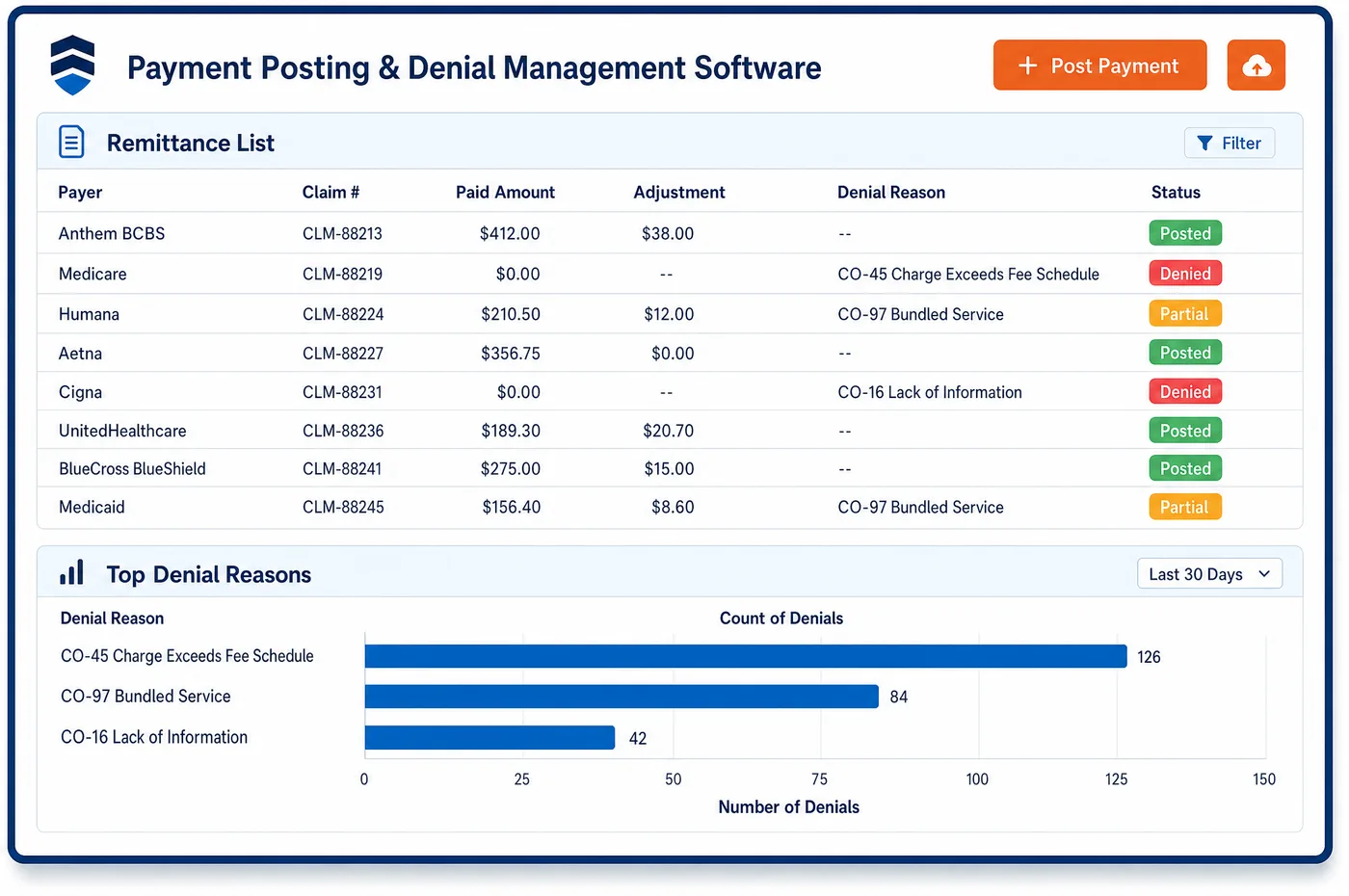
Payment Posting in a Multi-Specialty Practice
A multi-specialty group rarely receives one payment for one department. A payer sends an electronic remittance, the 835, that may cover primary care, cardiology and physical therapy claims together. One bank deposit may hold several remittances. Payment posting software reads the remittance, matches each line to its claim, and posts the payment, the contractual adjustment and the patient share line by line. Each line then follows the claim back to its department, location and billing entity. Reason codes steer the exceptions, so a denial goes to the owner of that specialty's denial management queue while clean lines post with no touch. Patient payments taken at any front desk apply to the right account and entity. The deposit total is then checked against the posted total, so the bank, the ledger and the remittances agree before the day closes. The ledger is right for each department and each Tax ID, not only in total.
Why Is Payment Posting Different in Multi-Specialty?
The first difficulty is ownership. A single remittance can carry lines for several rendering providers, and one group can hold several Tax IDs, each with its own payer contracts and bank accounts. When a posting team treats the group as one pool, cash lands in the wrong entity and the department that earned it never sees it. Posting has to follow each claim back to the entity that billed it.
Each specialty also draws its own adjustments. A surgical department sees multiple-procedure reductions, a lab sees bundled-test denials, and a therapy department sees visit-limit denials. A rule built for one department's reason codes misroutes the next one's. Staff who post for the whole group need the department attached to every line, because the same code can lead to different AR follow-up in each area.
Patient payments add a third layer. A patient who sees three departments may pay one copay at a front desk and a balance by phone for another visit. If those payments post to a general account, the wrong receivable shrinks, and a later refund goes to the wrong entity. Every credit has to trace to the claim line it belongs to, especially when a payer later recoups money.
What Multi-Specialty Payment Posting Software Handles
- ERA and EFT matching
- The 835 is the HIPAA standard for electronic remittance, and a separate EFT standard carries the payment. Staff match each deposit to its remittance by the trace number, so a deposit that spans several entities can be traced back to its claims. (CMS: HIPAA adopted standards and operating rules (835 remittance and EFT))
- Contractual adjustment (CARC 45)
- CARC 45 reports a charge that exceeds the fee schedule or contracted amount. Posting writes that amount off to the contractual adjustment of the department that billed, so each department's net revenue is its own. (X12: Claim Adjustment Reason Codes)
- Other coverage (CARC 22)
- CARC 22 says the care may be covered by another payer under coordination of benefits. These lines leave the posting queue for a coverage check, where staff apply Medicare secondary payer rules before anything is billed to the patient. (X12: Claim Adjustment Reason Codes)
- Sequestration (CARC 253)
- CARC 253 reports a reduction in federal payment from sequestration. It posts as its own adjustment, so a department's contractual write-offs are not overstated by a federal reduction. (X12: Claim Adjustment Reason Codes)
- Recoupments and reversals
- A payer takeback appears on the remittance as a reversed claim or a provider-level adjustment, and may be netted against new payments. Staff post the reversal to the original claim and entity, not to the claims paid that day. (X12: Transaction sets (835 payment and remittance advice))
- Overpayment refunds
- Under the Medicare Part A and B overpayment rule at 42 CFR 401.305, an identified overpayment must be reported and returned. A credit found on one department's account is refunded by the entity that was paid. (eCFR: 42 CFR 401.305, Requirements for reporting and returning of overpayments)
How Does Multi-Specialty Payment Posting Software Work?
1. Receive the remittance and deposit
Remittances arrive electronically, and each deposit is tied to the remittance that explains it. A deposit that holds payments for more than one Tax ID is split by payee before posting starts.
2. Match lines to claims
Each service line is matched to its claim, and with it to the department, location and rendering provider. Lines that do not match go to a payment posting exception list instead of being forced into an account.
3. Post payment and adjustments
The payment, the contractual write-off and the patient share post as separate entries. Group and reason codes decide which entry each amount becomes.
4. Route exceptions by department
Denials, other-coverage lines and zero-pay lines go to the queue of the department that billed. The owner sees the code, the claim and the remittance together.
5. Apply patient payments
Payments taken at any location apply to the account and claim line they were meant for. A credit left over after posting is held for review, not parked.
6. Reconcile the day by entity
The deposit total is checked against posted totals for each entity. Differences are listed with the remittance behind them, so they can be cleared before close.
Multi-Specialty Payment Posting Software vs. Generic Software
| Area | Generic approach | Unlimited Systems |
|---|---|---|
| Multi-entity deposits | One deposit is posted as a lump to a single account. | Staff split each deposit by payee and entity before posting. |
| Department attribution | Cash is known only by payer, so departments are guessed at month end. | Every line carries its department and location from the claim. |
| Takebacks | Recoupments are found when a balance looks wrong. | Reversals post to the original claim, with the remittance attached. |
| Other-coverage lines | Billed to the patient by default. | Held for a coverage check before any patient balance is created. |
| Patient credits | Parked on a general account. | Traced to the claim line, with refunds sent by the entity that was paid. |
Who Uses It in a Multi-Specialty Practice
- Posting specialist: One queue of remittances and exceptions, with each line already tied to its claim, department and entity, so work is about exceptions rather than keying.
- Group controller: Cash by Tax ID that agrees with the bank, plus a clean hand-off of totals to healthcare accounting at close.
- Department manager: The payments, adjustments and denials for the manager's own specialty, without sorting through the rest of the group's cash.
Multi-Specialty Payment Posting Software FAQs
Payment posting reads the electronic remittance and matches every service line to its claim. The claim already knows its department, location, provider and billing entity, so the payment, write-off and patient share post to those places. One remittance can therefore update several departments at once without staff splitting it by hand.
Yes. Cash posts to the entity named on each claim and remittance, and each deposit is reconciled by entity. This keeps one Tax ID's receipts from being applied to another's claims, and it gives the controller totals that match each bank account rather than a single pooled figure.
Denials found during posting go to the queue of the department that billed the claim. The task carries the reason code, the remittance and the claim, so a specialty's billers or its clinical lead can act on it. Routine paid lines never enter a queue, which keeps staff on the exceptions.
A takeback is posted to the original claim and the entity that was paid, even if the payer netted it against newer payments. That keeps each department's revenue honest and gives the controller a clear trail. If the takeback creates a credit, the entity that received the money handles the refund.
A patient payment applies to the account and claim line it was taken for, no matter which location collected it. If a patient pays at one desk toward a balance owed to another department, staff see the owning department and entity, and the group's books show the amount as collected for the right place.
Posting settles what a payer has paid, and AR management works what remains unpaid. When posting leaves a balance, the claim moves to the follow-up worklist with its department attached. When AR work finds a payment that was never posted, staff correct it in posting so both views agree.
Related Multi-Specialty Software
Payments & AR
In the revenue cycle
Payment Posting for related specialties
Sources
GET STARTED
See Unlimited Systems in Action
Whether you're actively evaluating new technology or simply preparing for your next vendor renewal, Unlimited Systems can help you understand where your current workflows may be creating avoidable revenue risk.