

Payments & AR
Chiropractic AR Management Software
Work open chiropractic claims across health plans, Medicare, auto carriers and work-injury cases, with personal injury balances tracked to settlement.
Chiropractic AR Management Software tracks every unpaid insurance claim from a chiropractic office. It sorts open claims by value, age and filing deadline. It keeps personal injury and workers' compensation cases apart from routine health plan claims, and follows each injury case from the first bill to settlement or payment.



 6,500+ specialty providers
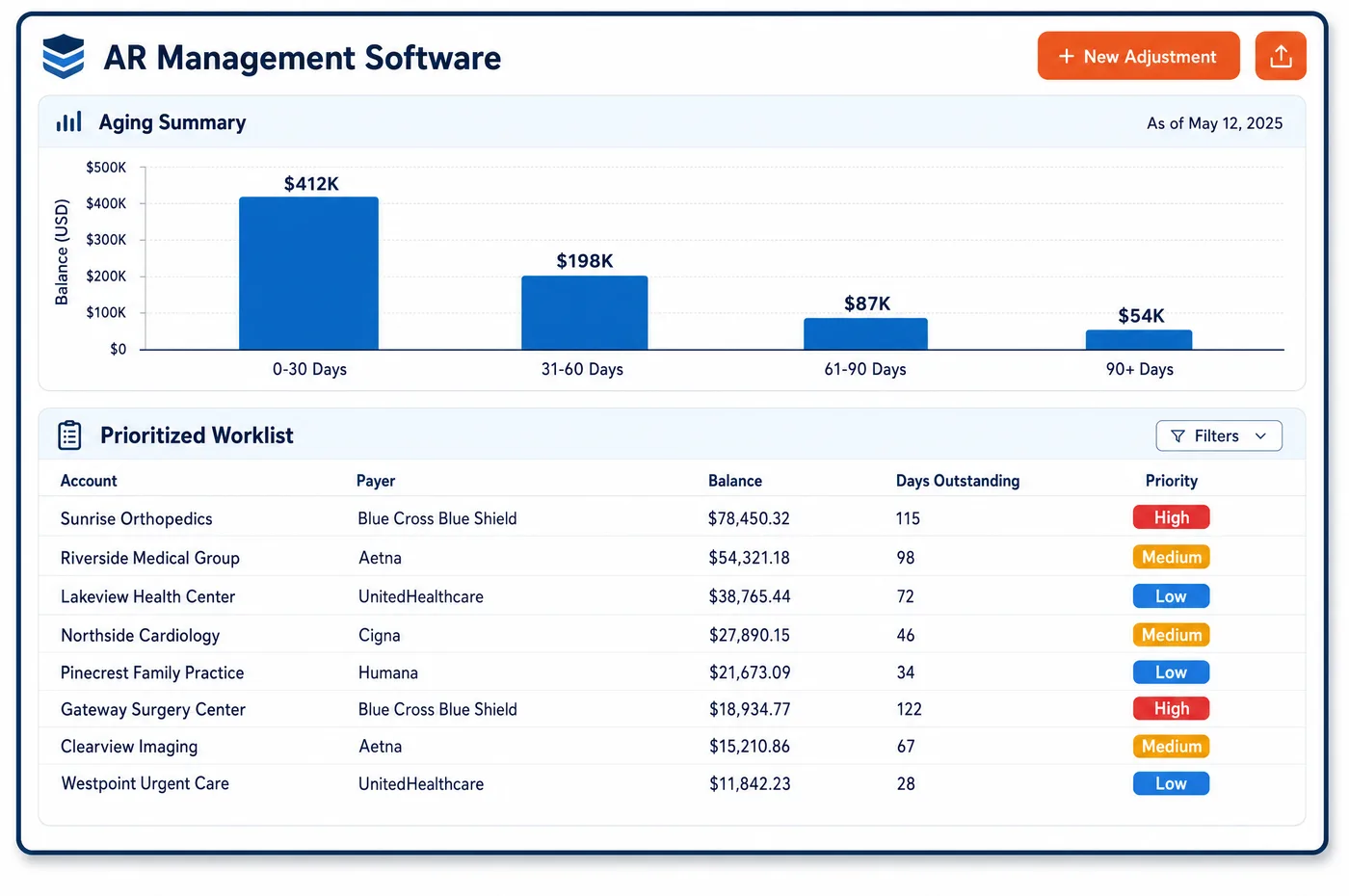
AR Management in a Chiropractic Practice
Chiropractic AR has two very different halves. One half is health plan and Medicare claims: many small visits that should pay in a normal cycle. The other half is injury work. Auto, liability and workers' compensation claims can stay open far longer, and some balances wait on a lawsuit or settlement. Unlimited Systems builds worklists that rank claims by balance, aging bucket and the time left to file. Bulk 276 status requests check health plan claims before anyone calls. Injury claims sit on their own worklist, grouped by case, with the carrier claim number, the adjuster, the attorney and any records requests in one place. When a primary payment posts, the leftover balance is billed to the secondary payer. The result is that small routine claims get worked in bulk while the big injury cases get steady, case-by-case attention.
Why Is AR Management Different in Chiropractic?
Most chiropractic claims are small. A spinal manipulation visit pays less than many procedures in other fields, so a single claim rarely looks urgent. But a care plan can produce a long run of them for one patient. When a payer denies the whole run for the same reason, such as a visit limit or a missing authorization, the loss adds up fast. AR management here means grouping open claims by cause and payer, not just by dollar value.
Injury cases follow different rules. Auto no-fault coverage, liability insurers and workers' compensation carriers each have their own forms, deadlines and fee rules, and those vary by state. For a Medicare patient hurt in an accident, the practice must send the claim to the no-fault, liability or workers' compensation payer first. Medicare can pay on a conditional basis when that payer does not pay promptly, and it recovers from any settlement later. Each case needs a record of who was billed, when, and why.
Personal injury balances may also be held on purpose. Where state law allows, a practice may treat under a lien or a letter of protection and wait for the case to settle. Those balances are not late in the usual sense, yet they still need tracking. The attorney may change, the case may close, or the settlement may not cover the full bill. Without a case view, these accounts drift to the bottom of an aging report and are forgotten.
What Chiropractic AR Management Software Handles
- Medicare Secondary Payer order
- For an accident or work injury, the claim goes to the no-fault, liability or workers' compensation payer before Medicare. The worklist shows which payer was billed first and keeps the denial reason needed for a later Medicare claim. (CMS MLN006903: Medicare Secondary Payer (July 2025))
- CARC 19, 20 and 21
- Health plan denials that name a workers' compensation, liability or no-fault carrier are moved to the injury worklist. Staff open or update the case and bill the carrier the payer named. (X12 Claim Adjustment Reason Codes)
- Federal employee work injuries (FECA)
- For federal workers, OWCP limits paid chiropractic services to treatment to correct a spinal subluxation, and the report must state that x-rays support the finding. These cases are tagged so staff check that rule before billing. (20 CFR 10.311: Special rules for the services of chiropractors (FECA))
- Medicare filing limit
- Medicare claims must be filed within one calendar year after the date of service. That deadline, and each other payer's, sets the order of the worklist. (42 CFR 424.44: Time limits for filing Medicare claims)
- 276/277 claim status
- Bulk status requests go to health plans and Medicare before anyone calls. The 277 reply shows which claims are pending, paid or denied, so collectors call only about real problems. (X12 transaction sets: 276/277 claim status and 835 remittance)
- Additional documentation requests
- A Medicare contractor may ask for records to support a chiropractic claim. The claim is marked as waiting on an ADR, and the response is tracked, since failing to respond is a major reason for denials. (CMS MLN1232664: Medicare Documentation Checklist and Guidelines for Chiropractic Doctors (April 2025))
- Records for attorneys and carriers
- Notes sent to a patient's attorney need the patient's signed HIPAA authorization. Each request is logged on the case with its date, what was sent and whether the authorization is on file. (45 CFR 164.508: Uses and disclosures for which an authorization is required)
How Does Chiropractic AR Management Software Work?
1. Split routine and injury AR
Health plan and Medicare claims go to one worklist. Auto, liability and workers' compensation claims go to a case-based list, so each kind is worked the way it needs.
2. Rank by value and deadline
Routine claims are ordered by balance, aging bucket and time left to file. Claims close to a filing limit move to the top.
3. Check status in bulk
276 requests go out for claims past their expected pay date. Claims the payer shows as in process drop off the call list.
4. Work denials by cause
Visit-limit, authorization and wrong-payer denials are grouped by payer. Staff fix the cause once for the whole group and pass repeat problems back through chiropractic denial management.
5. Follow each injury case
Case notes track the adjuster, attorney, records sent and settlement status. Staff set the next follow-up date on the case, not on each visit.
6. Bill the secondary and close
When the primary payment posts, the remaining balance is billed to the secondary payer. Balances left after all payers have paid move to patient statements.
Chiropractic AR Management Software vs. Generic Software
| Area | Generic approach | Unlimited Systems |
|---|---|---|
| Worklist order | One aging list sorted by date of service. | Separate routine and injury lists, each sorted by value and deadline. |
| Personal injury balances | Left in the oldest aging bucket with no notes. | Tracked by case, attorney and settlement status. |
| Status checks | Staff call or log in to each payer portal. | Bulk 276 requests run before anyone calls. |
| Repeat denials | Worked one visit at a time. | Grouped by cause and fixed for the whole run. |
| Records requests | Sent by whoever answers the phone, with no log. | Logged on the case with the HIPAA authorization. |
Who Uses It in a Chiropractic Practice
- AR collector: A morning list with payer status already checked, and injury claims kept apart so routine follow-up moves fast.
- Personal injury coordinator: One view per case with the carrier, adjuster, attorney, records sent and the balance waiting on settlement.
- Clinic owner: A clear picture of what routine AR is late and what injury AR is simply waiting, so cash forecasts match reality and posted payments line up with what is still owed.
Chiropractic AR Management Software FAQs
AR management puts personal injury claims on a case-based worklist instead of the general aging list. Each case shows the carrier, the adjuster, the attorney, the records sent and the settlement status. Staff set a follow-up date for the case. When the case settles or the attorney changes, the balance is updated, so a held balance never slips quietly into an old aging bucket.
Medicare pays second when no-fault or liability insurance covers an accident. The practice bills that insurer first. If it denies or does not pay promptly, Medicare may make a conditional payment, and the denial reason must be on the claim sent to Medicare. Medicare can later recover that payment from a settlement, so the case record needs every bill and response.
Workers' compensation rules, fee schedules and forms differ by state, and federal employees are covered by their own program. Under that federal program, paid chiropractic care is limited to treatment to correct a spinal subluxation shown by x-ray. Each case is tagged with its program, so staff follow the right rules and deadlines for that carrier.
Visit-limit denials are grouped by payer and patient instead of worked one visit at a time. Staff compare the payer's visit count with the visits billed and the plan's limits. If the payer counted wrong, one appeal covers the run. If the limit was real, the visits move to the patient under practice policy, and future visits are flagged before they are billed.
Claim status is checked in bulk with 276 requests to Medicare and health plans. The 277 reply shows whether each claim is pending, paid or denied. Claims still in process come off the call list, so collectors spend their time on denials and stalled claims, not on payers that are already working the claim.
An additional documentation request marks the claim as waiting on records. Staff gather the initial exam, the treatment plan and the notes for every billed date, plus the ABN if one applies. The response is logged with the date it was sent. Tracking the request matters, because a missed response is a common reason chiropractic claims are denied.
Related Chiropractic Software
Payments & AR
In the revenue cycle
AR Management for related specialties
Sources
- CMS MLN006903: Medicare Secondary Payer (July 2025)
- X12 Claim Adjustment Reason Codes
- 20 CFR 10.311: Special rules for the services of chiropractors (FECA)
- 42 CFR 424.44: Time limits for filing Medicare claims
- X12 transaction sets: 276/277 claim status and 835 remittance
- CMS MLN1232664: Medicare Documentation Checklist and Guidelines for Chiropractic Doctors (April 2025)
- 45 CFR 164.508: Uses and disclosures for which an authorization is required
GET STARTED
See Unlimited Systems in Action
Whether you're actively evaluating new technology or simply preparing for your next vendor renewal, Unlimited Systems can help you understand where your current workflows may be creating avoidable revenue risk.