
Billing & claims
Diagnostic Imaging RCM Software
From the order to the last payment, one view of who bills the technical part, who bills the read and where each study stalls.
Diagnostic Imaging RCM Software follows each study from the order to the final payment. It tracks who bills which part of the exam, since the center, a radiology group or a hospital may each own one piece. It also shows where studies stall: missing approvals, unsigned reports, ordering provider errors, reduced multiple-study payments and unworked denials.



 6,500+ specialty providers

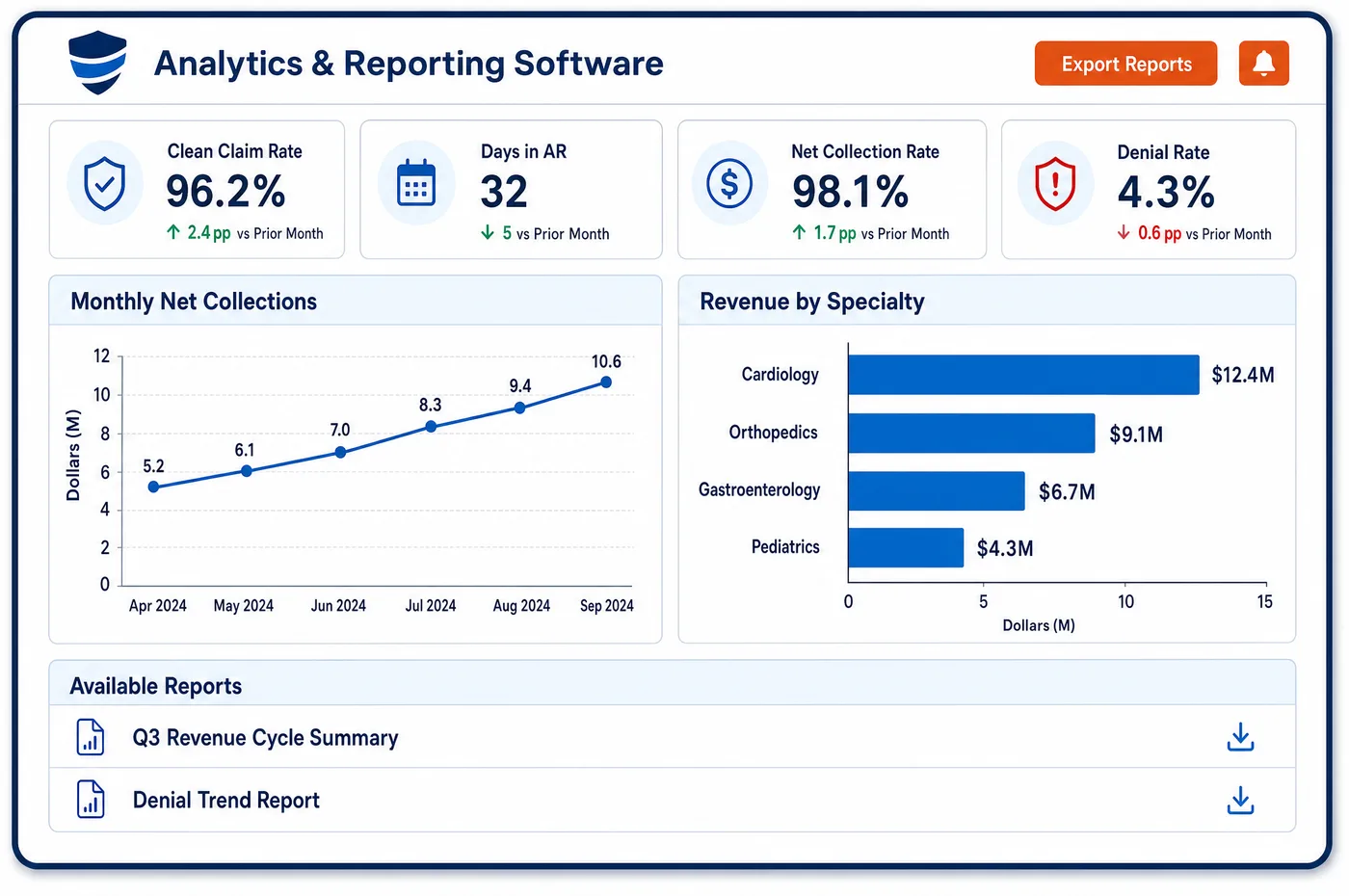
RCM in a Diagnostic Imaging Practice
Imaging revenue cycle work starts before the patient arrives and ends after the report is signed. Eligibility and approvals are settled first. The exam is done, the technologist's record is closed, and the radiologist signs a report. The global and professional charges both depend on that signed read. Then the claim is built and sent, and payments and adjustments are posted. Denials and short pays are worked by value and deadline. Imaging RCM software keeps all of that on one study record, so a manager can see whether a stalled exam is waiting on an order, a report or a payer. The detailed work of building and sending claims is covered in imaging medical billing. RCM is the layer above that work: who owns each step, which measures show trouble, and what to fix first.
Why Is RCM Different in Diagnostic Imaging?
Imaging splits one exam into two billable parts. The technical component covers the equipment, the technologist and the room. The professional component is the radiologist's interpretation and written report. A center that owns the scanner and employs its radiologists can bill both on one global claim. When a separate radiology group reads the study, each party bills its own part. RCM has to know which model applies to each exam and site.
Payers also change the math on the technical side. Medicare cuts payment for the technical component when a CT scanner does not meet the NEMA XR-29-2013 dose standard. It reduces the technical payment for second and later imaging studies on the same date. It pays contrast agents separately from the exam. A manager looking only at the charge amount will misread what the center is owed. RCM has to build expected payment from these rules, or short pays look like errors.
Front-end work matters more in imaging than in most fields. The patient is often a stranger to the center, the order is written by someone outside it, and advanced studies may need approval from a radiology benefit manager before the day. Missing orders and approvals are caught cheaply at booking and expensively after the scan. RCM built around these facts spends its effort at the start.
What Diagnostic Imaging RCM Software Handles
- Global, technical and professional billing
- When one entity furnishes both parts in the same payment locality, it can bill the global code with no modifier. Otherwise the reader bills the code with modifier 26 and the owner of the equipment bills the technical part. RCM assigns an owner to each part of each exam. (CMS Medicare Claims Processing Manual, Chapter 13, Sections 20 and 150: Radiology Services and Other Diagnostic Procedures)
- Place of service for the professional component
- For Medicare, the place of service on the reader's claim is the setting where the patient received the technical service, even when the reading happens from a remote office. The cycle checks that both claims use the same setting. (CMS Medicare Claims Processing Manual, Chapter 13, Sections 20 and 150: Radiology Services and Other Diagnostic Procedures)
- Hospital inpatient studies
- Medicare does not pay a supplier for the technical component for a hospital inpatient, and claims that fall in the stay are recouped. Registration status is checked before an outside claim is built. (CMS Medicare Claims Processing Manual, Chapter 13, Sections 20 and 150: Radiology Services and Other Diagnostic Procedures)
- Multiple imaging reduction
- Medicare reduces payment for the technical component of second and later imaging studies on the same date of service, and carriers report it with claim adjustment reason code 59. Expected payment is figured with the reduction, so short pays are not mistaken for underpayment. (Noridian Medicare: Allowed amount reductions (diagnostic imaging, technical and professional component))
- Modifier CT for non-compliant CT equipment
- Medicare reduces the technical payment for CT on equipment that does not meet NEMA XR-29-2013 and requires modifier CT on those services. The center records which scanners comply, so the modifier is applied when needed and left off when not. (Noridian Medicare: Modifier CT (CT equipment not meeting NEMA XR-29-2013))
- Contrast agents paid by HCPCS code
- Low osmolar contrast is reported with Q9965, Q9966 or Q9967, chosen by the iodine concentration of the agent given, and Q9951 is for 400 or more mg per mL. The NCCI manual says the code follows the product used, so staff pick it from the contrast record. (CMS NCCI Policy Manual for Medicare Services, Chapter XII: HCPCS Codes A0000-V9999)
- AUC program on hold
- CMS paused the appropriate use criteria program and rescinded its rules at 42 CFR 414.94. The cycle needs no consultation step for Medicare studies, and managers recheck the CMS page for any restart. (CMS: Appropriate Use Criteria Program (current status))
How Does Diagnostic Imaging RCM Software Work?
1. Clear the study before the visit
Staff check eligibility, the order and any approval when the exam is booked. This is the cheapest point to catch a missing order or a plan that sends the study to a benefit manager, and it is the first stage of imaging financial clearance.
2. Close the exam and the read
The technologist's record and the signed report mark the study complete. A study with a finished scan but no signed report waits in a queue, and the owner of the read is named on it.
3. Build and send the claims
Charges are assembled, checked and sent to the payer, as global, technical or professional claims according to the owner of each part. Details of that work sit in medical billing for the center.
4. Post, reconcile and follow up
Remittances are posted, short pays are compared against what the payer's rules say they should be, and open accounts are listed for follow-up. Nothing goes to a collector without a reason on the record.
5. Work denials and read the numbers
Denials are sorted by reason, value and deadline. Managers read clean claim rate, denial rate and days in accounts receivable by payer, by exam type and by site, so the next fix is chosen with data.
Diagnostic Imaging RCM Software vs. Generic Software
| Area | Generic approach | Unlimited Systems |
|---|---|---|
| Ownership | One billing queue for every exam, whoever owns the read. | Global, technical and professional parts each have an owner. |
| Expected payment | Charge amount treated as the goal. | Expected payment reflects multiple-study cuts, CT modifier and contrast rules. |
| Front end | Approvals chased after the exam. | Orders and approvals checked when the study is booked. |
| Stalled studies | Found when someone asks. | Listed by cause: order, approval, report or payer. |
| Reporting | Totals for the whole center. | Measures by payer, exam type, site and owner of the read. |
Who Uses It in a Diagnostic Imaging Practice
- Imaging center owner: A view of what each exam type earns after payer rules, and which sites or payers hold up cash.
- Billing director: One list of stalled studies by cause, so staff time goes to the largest or oldest problem first, and a hand-off to imaging denial management for what is already denied, after charge validation rules have run.
- Radiology group administrator: A clear line between the center's technical claims and the group's professional claims for the same study.
Diagnostic Imaging RCM Software FAQs
RCM software for a diagnostic imaging center covers the whole path of a study: order, eligibility, approval, scan, signed report, claim, payment and denial. It tracks who bills the technical part and who bills the read. It also shows where studies stall, so a manager can fix the cause rather than chase each account.
When one entity does not furnish both parts, the center bills the technical component and the reading physician bills the professional component with modifier 26. Each claim carries the place of service where the patient was scanned. The center bills the global code only when it furnishes both parts in the same payment locality.
Imaging payments can be lower than the charge for reasons built into payer rules. Medicare reduces the technical component for second and later studies on the same date, and cuts the technical payment for CT on non-compliant equipment. Contractual write-offs also apply. RCM software figures the expected payment first so staff can see real shortfalls.
The choice depends on volume, staffing and payer mix. An in-house team knows the referring offices and the payer rules for its own scanners. An outsourced team can add capacity. Either way, the center needs the same study-level view of orders, approvals, reports and claims, since those decide whether money is collected.
Useful measures include clean claim rate, denial rate by reason, days in accounts receivable and the count of studies waiting for a signed report. Each should be read by payer, exam type and site. A high denial rate on one modality often points to a missing approval rule rather than a billing error.
CMS paused the appropriate use criteria program and rescinded its regulations at 42 CFR 414.94 in the CY 2024 physician fee schedule final rule. Imaging centers do not need to collect a consultation for Medicare studies. The program remains a topic to monitor, so managers should check the CMS page from time to time.
Related Diagnostic Imaging Software
Billing & claims
RCM for related specialties
Sources
- CMS Medicare Claims Processing Manual, Chapter 13, Sections 20 and 150: Radiology Services and Other Diagnostic Procedures
- Noridian Medicare: Allowed amount reductions (diagnostic imaging, technical and professional component)
- Noridian Medicare: Modifier CT (CT equipment not meeting NEMA XR-29-2013)
- CMS NCCI Policy Manual for Medicare Services, Chapter XII: HCPCS Codes A0000-V9999
- CMS: Appropriate Use Criteria Program (current status)
GET STARTED
See Unlimited Systems in Action
Whether you're actively evaluating new technology or simply preparing for your next vendor renewal, Unlimited Systems can help you understand where your current workflows may be creating avoidable revenue risk.