
Billing & claims
Multi-Specialty RCM Software
Run one revenue cycle across every department, with each specialty's contracts, enrollment and denials visible side by side.
Multi-Specialty RCM Software manages the whole revenue cycle for a group with several departments, from registration and eligibility through claims, payments and denials. It keeps each specialty's payer contracts, provider enrollment and denial patterns visible side by side, so leaders can see which department or payer is slowing cash.



 6,500+ specialty providers

RCM in a Multi-Specialty Practice
A multi-specialty group does not have one revenue cycle. It has several, running on one front desk and one billing office. Multi-specialty RCM software runs the same steps for every department: clear coverage, assemble charges, validate them, send claims, post payments and work denials. Each step reads the department's own rules. Primary care needs fast, high-volume visit claims. Surgery needs global period and modifier checks. Imaging needs the technical and professional split. Staff can see results by department, payer and provider, so a problem in one specialty does not hide inside a group total. Work moves through queues that the practice configures, with an owner and a due date on each item. Claims go out through medical billing, and denials return to a queue sorted by value and filing deadline. Early steps rest on financial clearance, so fewer problems reach the claim.
Why Is RCM Different in Multi-Specialty?
Payers treat departments differently, even inside one group. A plan may pay one fee schedule for primary care, another for a surgical specialty, and a different rate for a hospital-based department. Payment can also change with the site of service. A group-wide average hides all of this, so the reasons a department underperforms stay out of sight.
Enrollment adds its own work. A group enrolls with Medicare and each payer, lists its locations and links each clinician to the group. Each physician self-designates a Medicare specialty on the enrollment form, and a physician cannot enroll under the single and multi-specialty group code. If a new clinician or a new site is not set up with every payer before the first claim, that department sees denials that have nothing to do with coding.
Ownership is also harder. Each department thinks its denials belong to billing, and billing thinks documentation belongs to the department. With several specialties and sites, nobody sees the full pattern unless the revenue cycle is run as one process with shared queues and clear owners. That is the main job of RCM in a group, and it is why a single view across departments matters.
What Multi-Specialty RCM Software Handles
- Group enrollment and locations
- A group enrolls with Medicare on form CMS-855B, which lists its practice locations and the practitioners who reassign their benefits to it. New sites and clinicians have to be added before claims go out under them. (CMS: Form CMS-855B, Medicare Enrollment Application for Clinics, Group Practices and Certain Other Suppliers)
- Specialty designation by clinician
- Physicians self-designate their Medicare specialty on the enrollment application, and a physician may not carry the specialty code for a single or multi-specialty clinic or group practice. Each clinician's enrolled specialty drives how Medicare treats the claim. (CMS Medicare Claims Processing Manual, Chapter 26 (section 10.8, Requirements for Specialty Codes; Item 32))
- Taxonomy codes and specialty
- The NUCC Health Care Provider Taxonomy code set defines a provider's area of specialty, not the services rendered, and providers select their own codes. Payers read the taxonomy on 837 claims, so each department's providers need the right ones on file. (NUCC: Health Care Provider Taxonomy Code Set)
- Duplicate denials across departments
- Payers return CARC 18, exact duplicate claim or service, only with group code OA in most cases. Two departments billing the same patient on the same day can trigger it by mistake, so each claim needs its own rendering provider and service detail; see duplicate claim denials. (X12: Claim Adjustment Reason Codes (CARC 18))
- Same-day visits across specialties
- Under Medicare, physicians of different specialties in the same group may bill and be paid without regard to their membership in the group. Physicians of the same specialty are treated as a single physician for evaluation and management visits on the same day. (CMS Medicare Claims Processing Manual, Chapter 12 (section 30.6.5, Physicians in Group Practice))
How Does Multi-Specialty RCM Software Work?
1. Set up enrollment, contracts and fee schedules
Each payer, location and clinician is loaded with the department it belongs to. Contract rates and fee schedules are stored by payer and department.
2. Clear the front end
Registration, intake and clearance run for each visit. Problems found here, such as a missing referral, are fixed before the claim exists.
3. Assemble, validate and send
Charges are gathered by encounter, checked against specialty and payer rules, and sent as claims. Items that fail go to a queue with the reason attached.
4. Post and follow up
Remittances post to the ledger, and unpaid claims move to follow-up lists by payer and age. Staff work the oldest high-value items first.
5. Review by department
Managers compare departments on denials, days in AR and charge lag. Root causes feed back to the front end, using the same queues in denial management.
Multi-Specialty RCM Software vs. Generic Software
| Area | Generic approach | Unlimited Systems |
|---|---|---|
| View of performance | One group total that hides weak departments. | Results by department, payer and provider. |
| Contracts | Rates kept in paper binders or spreadsheets. | Rates stored by payer and department. |
| Work ownership | Billing and departments each assume the other owns a problem. | Queues have named owners and due dates. |
| New clinicians and sites | Enrollment gaps are found when claims deny. | Enrollment steps tracked before first claims go out. |
| Denial feedback | Reasons stay with the biller. | Reasons and root causes go back to the front end and the department. |
Who Uses It in a Multi-Specialty Practice
- Billing director: A view of the whole cycle by department, with queues that show what is stuck and who owns it. The director can compare payers and specialties without building a report by hand.
- Physician owner: A clear picture of which departments bring in cash and which are held back by denials or enrollment gaps. Decisions about hiring and sites rest on department-level facts.
- Department manager: Visibility into their own department's claims and denials, with the front-end work tied to patient scheduling so root causes are fixed at booking.
Multi-Specialty RCM Software FAQs
A group total can look healthy while one department struggles. Reporting by department, payer and provider shows where denials, slow payment or missed charges build up. Leaders then fix that cause, such as an enrollment gap or a contract rate, instead of adding staff across the whole billing office.
RCM software covers registration, eligibility and authorization, charge assembly and validation, claim submission, payment posting, denial work and patient billing. In a group, each step reads the rules of the department that provided the service. The pieces share one record so staff do not re-key data between steps.
The choice depends on staff, volume and how many payer contracts and specialties the group carries. Groups often keep front-end work in-house and send some back-end work out. Either way, one shared record and clear queues keep owners and results visible. The software supports both models.
Fee schedules and contracts can differ by specialty, site and provider group, even within one payer. Storing the rate by department lets staff compare payments with the contract and spot underpayments. It also makes it clear why one department's revenue per visit differs from another's.
Claims can deny when a clinician or site is not enrolled or linked to the group with a payer. Medicare group enrollment lists locations and reassigned practitioners, and commercial plans have their own forms. Tracking enrollment steps before a new clinician starts prevents denials that no coding fix can solve.
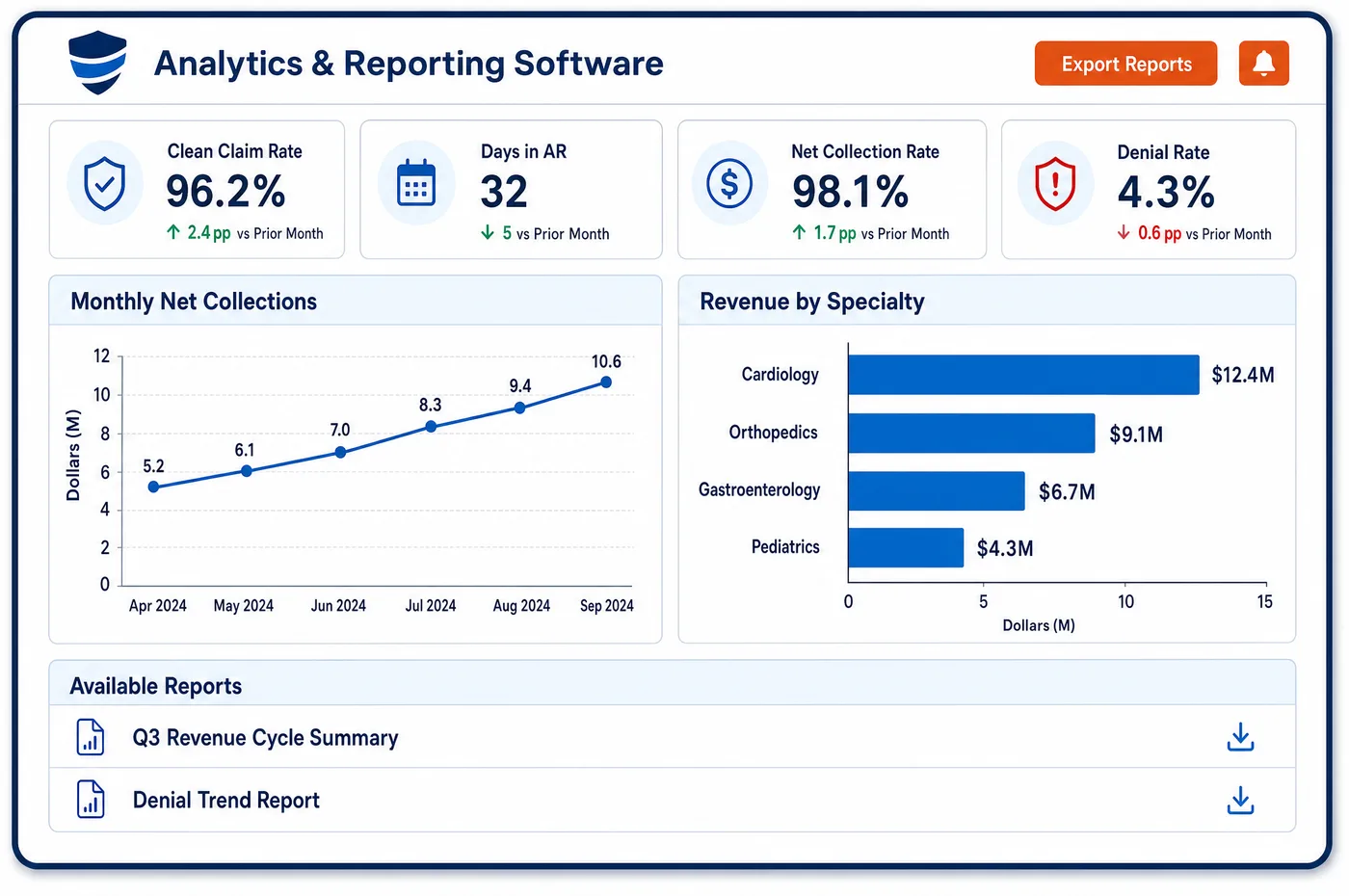
Common measures include days in AR, clean claim rate, denial rate, charge lag and net collection rate. In a group, each should be viewed by department and payer as well as in total. That shows whether a trend comes from one specialty, one payer or one site.
Related Multi-Specialty Software
Billing & claims
RCM for related specialties
Sources
- CMS: Form CMS-855B, Medicare Enrollment Application for Clinics, Group Practices and Certain Other Suppliers
- CMS Medicare Claims Processing Manual, Chapter 26 (section 10.8, Requirements for Specialty Codes; Item 32)
- NUCC: Health Care Provider Taxonomy Code Set
- X12: Claim Adjustment Reason Codes (CARC 18)
- CMS Medicare Claims Processing Manual, Chapter 12 (section 30.6.5, Physicians in Group Practice)
GET STARTED
See Unlimited Systems in Action
Whether you're actively evaluating new technology or simply preparing for your next vendor renewal, Unlimited Systems can help you understand where your current workflows may be creating avoidable revenue risk.